
Board members and business professionals spend the majority of their workdays in meetings, whether that’s around a conference room table, on the phone, or in front of their laptops on a video call. Regular meetings are crucial to discuss strategic objectives, manage crises, and cast votes on important matters.
Unfortunately, not all meetings are productive or easy. Some can be downright painful.
Board meetings can quickly become unproductive due to poor planning, lack of focus, and ineffective meeting leaders. These issues often stem from unclear board meeting agendas, inadequate preparation, or a failure to manage meeting time and discussions efficiently. The result: meetings fail to achieve their intended goals or make meaningful progress.
Communicating effectively in board meetings will accomplish more tasks, ensure good governance, and keep board members engaged.
Here are 5 skills to help you improve team communication skills around the boardroom.
Skill #1: Listen closely and pay attention to body language as well as verbal and nonverbal cues
Body language and nonverbal cues including facial expressions communicate a lot in board meetings. Verbal communication is also a central part of active listening, especially in remote and hybrid meetings that limit the chance to read nonverbal signals from other participants.
Below are some tips on how to use (and read) body language to improve your communication style in both in-person and remote meetings:
- Keep your arms uncrossed and your hands visible to appear more approachable and receptive. Show you’re engaged in the conversation by nodding and leaning in slightly.
- Make eye contact with the person speaking and engaging with what they’re saying. Nod your head when a board member is speaking to acknowledge that you’ve heard and understood what they’ve said.
- If you’re participating in an online meeting, consider turning on your camera so that the speaker can see that you’re listening closely to what they’re saying (and they avoid feeling like they’re just speaking to a blank screen).
- Watch for nonverbal cues from your colleagues that may suggest they’re a bit bored or getting distracted (perhaps they’re yawning or picking up their smartphones). Consider moving on to a different topic or shifting gears to invite their questions.
In remote and hybrid meetings, effective verbal communication in remote settings ensures that directors stay engaged. Turning your camera on is a good start, but you may not be able to read everyone’s facial expressions at once in a large meeting or gallery view.
Aim to use more verbal replacements for nonverbal cues, like saying “I agree” or “That makes sense” instead of nodding – or use more direct check-ins to read the room remotely.
Skill #2: Present confidently and stay focused
Presenting with confidence and maintaining focus are crucial skills for effective board meetings. Your demeanor and delivery can significantly impact how your message is received and how engaged your audience remains. By employing a few key strategies, you can enhance your presence and keep the board’s attention as you present.
Consider these tips:
- Prepare for interruptions and tough questions. If you’re challenged mid-presentation, pause, acknowledge the question, and respond thoughtfully. Staying composed under pressure signals confidence and helps you refocus the discussion when necessary.
- To keep the energy high, consider doing your presentation from a standing position or walking around the room.
- Use a calm tone of voice to help encourage open and productive discussions.
- Tell stories or use analogies to help make complex information more relatable, especially when presenting technical topics to board members who aren’t specialists in that area.
- Incorporate clear, concise visuals to support your points and maintain interest. Aim for one key point per slide and avoid dense text that competes with what you’re saying.
- End with a clear call to action that summarizes the key takeaways and outlines the next steps. This ensures each board member walks away with clear communication about what they need to do before the next meeting.
It’s easy for meetings to run longer than expected, but respecting the agenda keeps the meeting on track and signals that you value your colleagues’ time. Consider allocating a specific time for each topic and stating “It’s time to move on, but let’s put a pin in that discussion for now” when topics hit their time limit.
In Aprio, you can create agendas with timestamps for each topic, helping presenters know exactly when it’s time to wrap up or move on.

Skill #3: Come to the meeting prepared
It’s not uncommon for directors to travel a lot, have a full-time job, and sit on other boards. Board administrators also have busy and demanding roles, and generally work on small but mighty teams. Making sure everyone is prepared for the meeting is crucial, and also helps make meetings more efficient.
Board portal software helps admins easily create board packets digitally so that directors are well prepared when they arrive and can contribute in meetings. Board portal software helps admins easily create board packets digitally so that directors are well prepared when they arrive and can contribute in meetings. The agenda can include links to key documents, reminding directors which materials are relevant and allowing them to access links easily during meetings.
For directors, it’s crucial to review the agenda with an eye toward where you can contribute, flag questions in advance, and come to meetings ready to engage. In the Aprio board portal, directors can add annotations directly to digital documents and share notes with other board members ahead of time, so the entire team comes to each meeting prepared.
See related: The ultimate guide to effective board meeting agendas
With board management technology, you won’t spend time looking for missing documents or catching up on discussions. Instead, you’ll get a paperless board meeting that sets the stage for more effective communication.
Want more insights into board best practices? Subscribe to receive monthly news from Aprio.
By providing your email, you consent to receive communications from Aprio. You can unsubscribe at any time. See our Privacy Policy.
Skill #4: Facilitate the meeting flow
While keeping to an agenda is a crucial way to stay focused, it’s important to know when to stick to the plan and when to let the conversation take a different direction. Rigid facilitation can stifle the kind of organic discussion that leads to real insight, but too much flexibility means meetings run long without resolution.
The board chair plays a key role in ensuring best practices for board meeting facilitation, making real-time judgment calls about where the meeting’s energy and attention should go.
Consider these tips:
- Manage the flow of the meeting to ensure each agenda item is given appropriate time for discussion while also keeping the meeting on track.
- Recognize when to allow deeper exploration of a topic and when to steer the conversation back to the main objectives.
- When you let a discussion run long, do it deliberately. Decide what discussions will need to be shorter to make room, rather than letting the meeting run longer.
- Recognize when a topic is stuck. If the same points are being repeated, it may be time to table the item and assign a smaller group to return with a recommendation.
- When you sense energy lagging, ask questions to keep directors engaged. Alternatively, it may be a signal that the discussion has run its course, even if it hasn’t required the full amount of time you’ve set aside.
If you’re unsure about how to move forward, let the board participate in the decision. For example, when a meeting is running long, address it by saying “We’re running long on this, but it seems important; should we continue or move on?” This gives the rest of the board agency in deciding what they think is important to discuss.
Skill #5: Summarize the meeting & establish next steps
Before the meeting is over, take the time to quickly recap what you’ve covered and list out any next steps that need to happen before you meet again. When board members have clear documentation and action items, it helps ensure that the decisions made around the boardroom table translate into action.
Meeting minutes reinforce what the board discussed and decided, giving directors a reference point for complex action items. This also provides a single source of information rather than relying on individual board members to take notes.
Well-defined tasks keep momentum going between meetings, especially if it’s clear who is responsible for completing them. Each task should have clear priorities and deadlines so board members understand what tasks to focus on first and which ones can wait.
See related: How to take minutes at a board meeting
Aprio’s Board Task Manager also makes it easy to track action items and see which tasks got accomplished and what’s still outstanding. Encouraging accountability to follow through on task commitments is much easier with meeting communication tools that make progress visible between meetings.

Preparing for inclusive meeting communication
Diverse boards have the potential for higher-quality decisions, but that potential can only be realized when communication in diverse board meetings is managed strategically. When a small number of voices dominate discussions, boards risk missing critical perspectives and making less informed decisions.
These tips will help you ensure the entire team gets an equal chance to share their thoughts:
- Give board members alternatives to speaking, such as annotating agenda items. This allows quieter board members to contribute according to their preferred communication style.
- Use round-robin techniques for important decisions, inviting each board member to share their view before opening up the general discussion.
- For remote and hybrid meetings, establish norms like using the raise-hand feature to ensure remote participants aren’t talked over.
- Many boards already rotate presentations through committee updates, but consider whether the same members tend to speak on behalf of the committee. Assigning presentations based on individual directors’ expertise ensures everyone has a formal platform to contribute.
Hybrid meetings pose a unique challenge for inclusive communication: it’s easy for those meeting in person to respond to each other’s body language, make eye contact, or have side exchanges outside the meeting room. Remote participants can often become passive observers and feel sidelined during discussions.
To make hybrid meetings more equitable, treat them as remote-first. Ask direct questions specifically to remote attendees, ensure the camera captures the full room, and ask in-person participants to use microphones so everyone can hear the discussions.

Managing conflict when communicating in meetings
Engaged, thoughtful directors who care about the organization’s direction are bound to disagree at times. Poor communication will escalate tensions, while clear communication can channel conflict into productive outcomes.
Meeting leaders should operate from a position of neutrality to maintain a positive work environment, and encourage the board to do the same. That includes:
- Summarizing each position neutrally to identify where concerns overlap or diverge.
- Focusing on facts rather than interpretations, and returning to shared data to refocus the conversation.
- Establishing ground rules early, such as agreeing on norms like “critique ideas, not people,” and “assume good intent.”
- If a discussion becomes unproductive or repetitive, table it and assign a smaller group to return with a recommendation.
When board members understand communication protocols in board meetings, they’ll be equipped to navigate disagreement without derailing the conversation – and conflict becomes an inroad for stronger decision-making rather than a source of tension.
Using technology to enhance board communication
Good workplace communication requires emotional intelligence to navigate complex discussions and foster collaboration. That’s especially true for boards, where the outcome of high-stakes decisions rests on the board’s ability to work together effectively.
Board portal software improves board communication by centralizing all meeting materials, enabling secure and real-time document sharing, and connecting board members with collaboration tools including online chat. With more timely access to information, board members can communicate more effectively, whether they’re reviewing documents, voting on decisions, or engaging in discussions before, during, and after meetings.
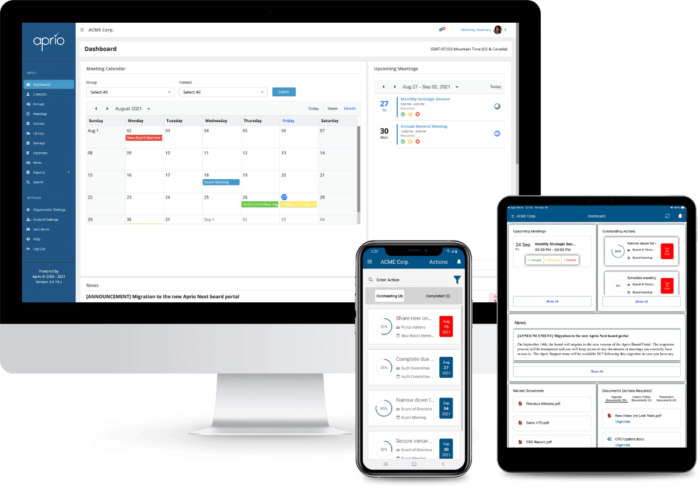
Ready to improve how your board communicates in and out of board meetings? Consider using Aprio board management software to better prepare board members, run online or hybrid board meetings and encourage inclusive participation with tools like surveys, polls and online voting. Talk with our team and we’ll happily answer your questions and show you how it works.
